
🎉 欢迎访问GreasyFork.Org 镜像站!本镜像站由公众号【爱吃馍】搭建,用于分享脚本。联系邮箱📮

Greasy fork 爱吃馍镜像

Joysound视频音效增强

🎵✨通用网页视频音效增强/优化。Enhance/Optimize video sound in web.

You will need to install an extension such as Tampermonkey, Greasemonkey or Violentmonkey to install this script.

You will need to install an extension such as Tampermonkey to install this script.

You will need to install an extension such as Tampermonkey or Violentmonkey to install this script.

You will need to install an extension such as Tampermonkey or Userscripts to install this script.

You will need to install an extension such as Tampermonkey to install this script.

You will need to install a user script manager extension to install this script.

(I already have a user script manager, let me install it!)

🚀 安装遇到问题?关注公众号获取帮助

公众号二维码

扫码关注【爱吃馍】

回复【脚本】获取最新教程和防失联地址

You will need to install an extension such as Stylus to install this style.

You will need to install an extension such as Stylus to install this style.

You will need to install an extension such as Stylus to install this style.

You will need to install a user style manager extension to install this style.

You will need to install a user style manager extension to install this style.

You will need to install a user style manager extension to install this style.

(I already have a user style manager, let me install it!)

🚀 安装遇到问题?关注公众号获取帮助

公众号二维码

扫码关注【爱吃馍】

回复【脚本】获取最新教程和防失联地址

نووسەر
qianjiachun
Daily installs
0
Total installs
33,416
Ratings
26 3 0
وەشان
2022.05.18.01
Created
2022-02-11
Updated
2022-05-18
Size
7.24 KB
مۆڵەت
MIT
Applies to
هەموو سایتەکان

Joysound视频音效增强 icon

🎵✨Joysound视频音效增强是一款基于Tampermonkey的脚本,使用wasm技术对网页中的视频音效进行增强优化,使得声音更加立体饱满

注意事项(Attention)

  1. joysound来源于acfun
  2. 若网页中没有video元素,则不起作用,常见有以下两种情况
    • video元素在iframe中
    • video元素在shadowRoot中
  3. 开启和关闭状态会自动进行保存
  4. 安装脚本后默认全局关闭,如果遇到网页视频没有声音的情况,请手动关闭音效
  5. 脚本启动后会将全局挂载的AudioContextwebkitAudioContext置为null,此举可能会导致原生网页的音效功能失效,请注意。
使用(Usage)

  1. 首先确保已经安装Tampermonkey
  2. 安装本脚本
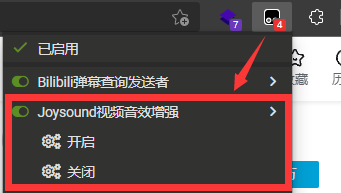
  3. 访问网页,点击Tampermonkey图标,在弹出的菜单(Menu)中即可选择开启/关闭音效

img

接口(API)

为了方便与其他脚本联动,本项目为用户提供了API

hasInstalledJoysound

// 判断是否安装了脚本,true则为已经安装
window.hasInstalledJoysound

enableJoysound

// 用于开启音效增强
window.enableJoysound();

disableJoysound

// 用于关闭音效增强
window.disableJoysound();

getJoysoundByVideoNode

// 对网页中自定义的video元素进行音效增强
let videoNode = document.querySelector("video");
let joysound = window.getJoysoundByVideoNode(videoNode);
joysound.enable(); // 开启
joysound.disable(); // 关闭

判断是否开启了Joysound

localStorage.getItem("Ex_isJoysound"); // 1开启 0关闭
