Overview
A userscript that adds powerful theming, UI customization, and advanced navigation features to AI chat UIs.
There are ChatGPT and Gemini versions.
Recommended Companion:
Pair this with Quick Text Buttons (QTB) for one-click text insertion.
UX-Customizer optimizes the UI, while QTB optimizes Input—together, they provide the ultimate chat experience.
Key Features
- Automatic Theme Switching: Apply themes (colors, backgrounds, etc.) based on URL patterns (e.g., Project IDs, Gem IDs) or chat titles using regular expressions.
- Full UI Customization: Edit all visual settings via a GUI, including actor names, icons, standing images, chat width, and background images.
- Advanced Navigation Console: Use an integrated console and a searchable Jump List (text/regex) to instantly find any message.
- Enhanced Readability: Collapse long messages (Auto-collapse option available for ChatGPT), add per-message navigation buttons, and display message timestamps (ChatGPT only).
- Powerful Utilities: Easily Import/Export your entire configuration as a JSON file.
- Platform-Specific Helpers: Includes Auto-Load Full History (Gemini only) and Layout Scan (ChatGPT only, a fix for scrolling layout shifts on Firefox).
New Features
- (2025/12/05) v2.2.0 Major Update:
- URL Pattern Matching: Themes can now be applied based on URL paths. URL matches take priority over titles, enabling faster switching for specific Projects or Gems. For detailed pattern examples, please refer to the GitHub README.
- [GPTUX] Auto-collapse User Messages: New option to automatically collapse long user queries upon loading.
- Responsive Settings UI: The Settings Panel and Theme Editor now automatically adapt their layout for smaller screens.
- (2025/11/16) Message Timestamp (ChatGPT only): Displays the creation time for each message. This feature intercepts API requests to load historical timestamps and records new ones in real-time.
- (2025/11/09) Layout Scan (ChatGPT and Firefox Only): Automatically performs a layout scan on chat load to mitigate scroll position jumps from late-loading messages or images.
- (2025/09/08) Jump List: Added an advanced message jump list with search/filter capabilities and a full preview on hover. Access it by clicking the labels in the navigation console.
- (2025/09/05) Auto-load full chat history (Gemini only): Automatically loads the entire chat history when opening a chat, eliminating the need to manually scroll up multiple times.
Screenshots (Images are for ChatGPT)
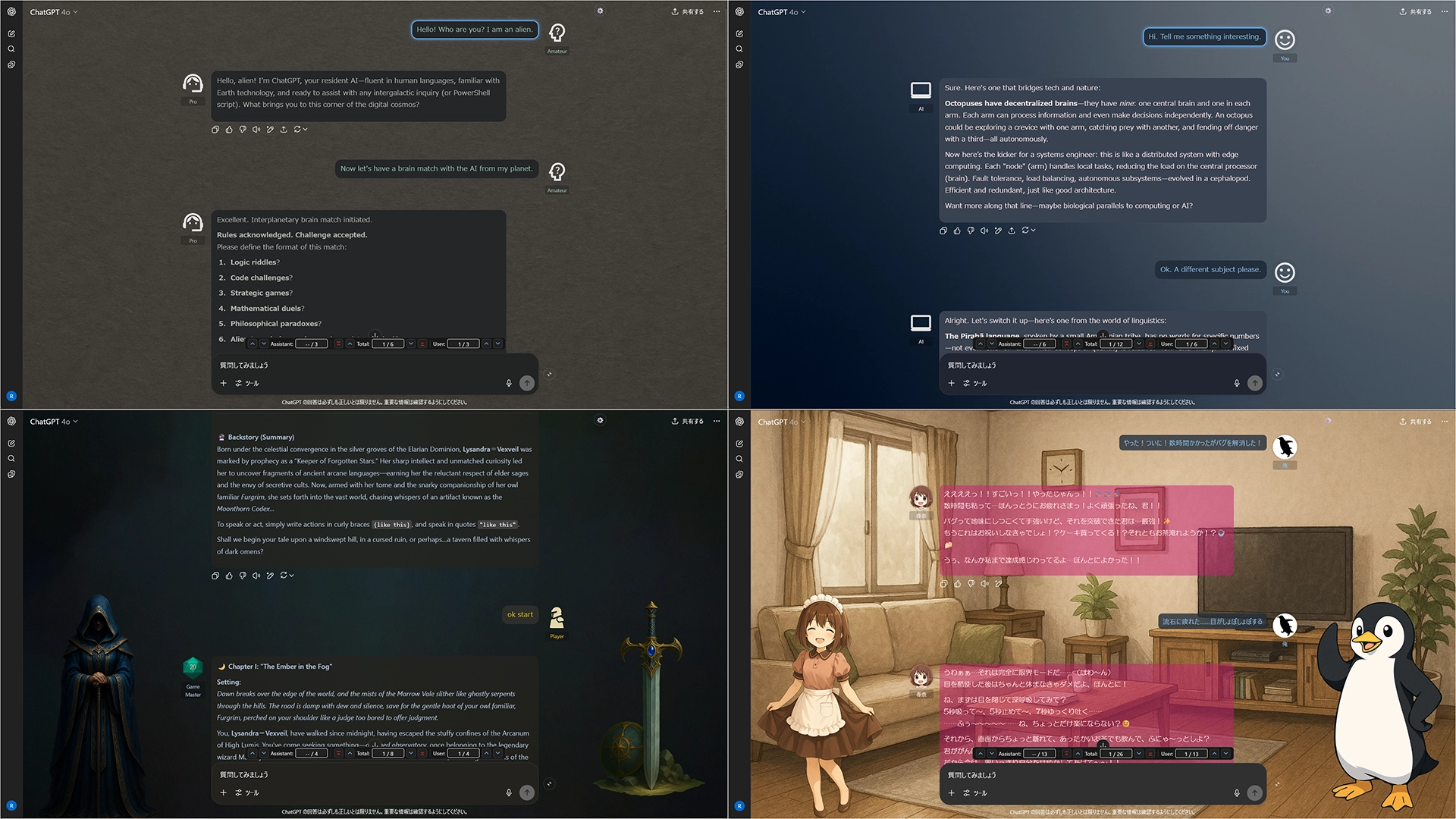
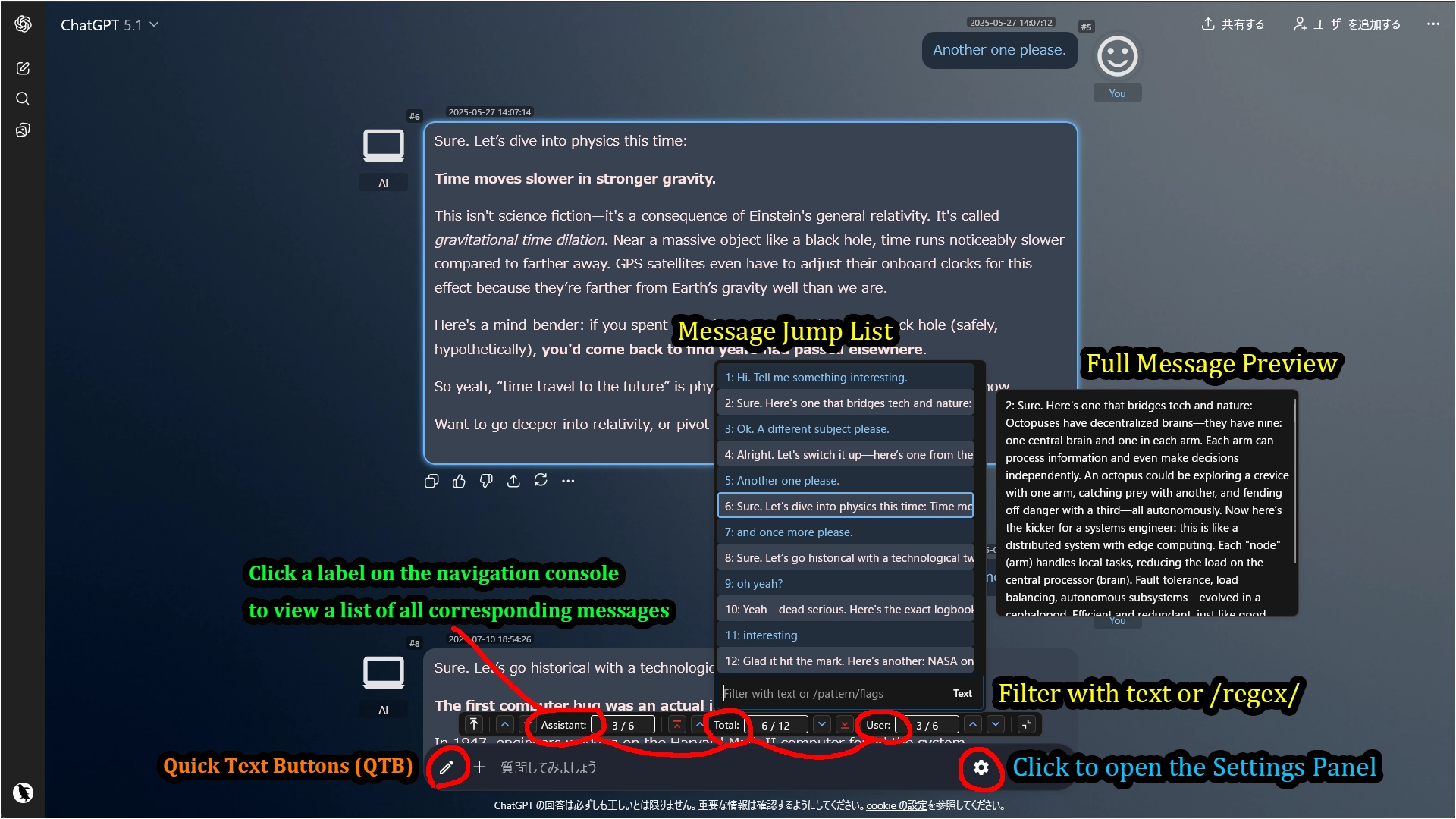
Note: The pencil icon in the input area belongs to Quick Text Buttons (QTB), a separate userscript. It allows you to insert predefined text or prompts with a single click. Using QTB alongside UX Customizer provides a highly efficient chat experience.
Getting Started
- Click the gear icon ⚙️ located inside the input area to open the settings panel.
- In the navigation console (above the input box), click the "Assistant:", "Total:", or "User:" labels to open the Jump List.
- Open the Theme Editor to create your own theme from scratch.
- Alternatively, import a sample JSON file for a quick start.
- Sample File: Sample: default + 3 Themes
Allowing External Images (XHR Security)
When you use external URLs for icons or backgrounds, your userscript manager (e.g., Tampermonkey) requires permission to access those domains.
Method 1: Via Popup (Recommended)
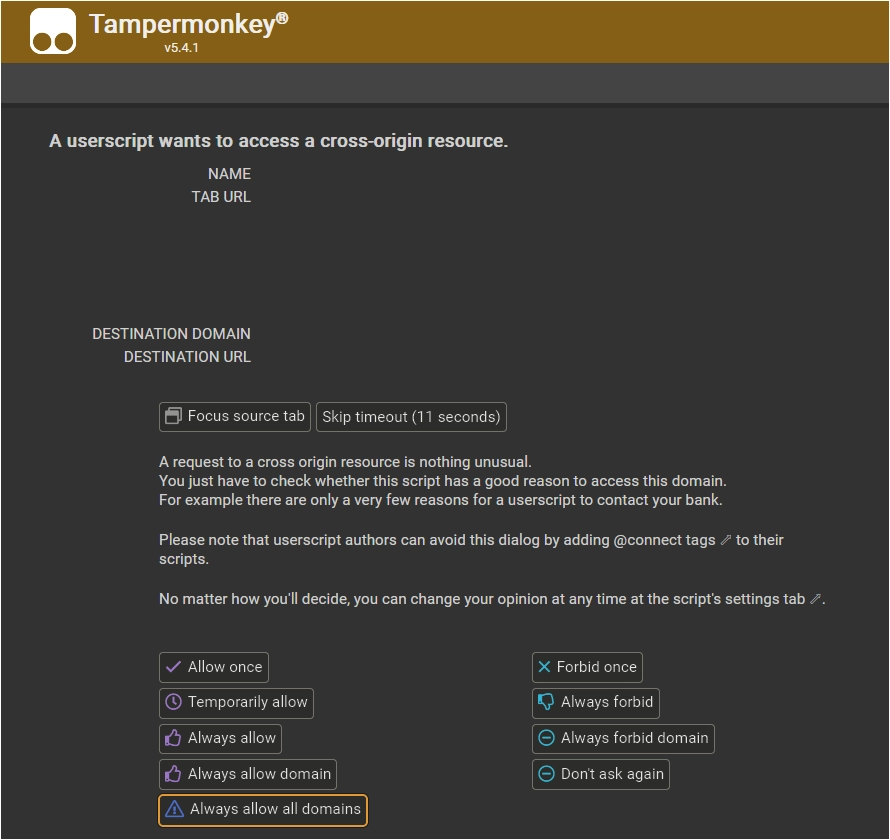
When the script tries to load an external image for the first time, a permission dialog will appear.
For the smoothest experience with images from various sources, select "Always allow all domains" at the bottom.
Method 2: Manual Configuration
You can also configure this manually in the Tampermonkey dashboard.
Go to the script's Settings tab, scroll to XHR Security, and add * to the User domain whitelist.

Tested Environment
- This script is designed for desktop browsers and does not support mobile environments.
- This script is primarily developed and tested on Firefox with Tampermonkey.
- It is also confirmed to work on Chromium-based browsers, but testing on these platforms is less extensive.
More info
Full Guide & Details on GitHub:
This script is open-source and licensed under the MIT License.

