
🎉 欢迎访问GreasyFork.Org 镜像站!本镜像站由公众号【爱吃馍】搭建,用于分享脚本。联系邮箱📮

Greasy fork 爱吃馍镜像

Greasy Fork is available in English.

YouTube - חסום תצוגה מקדימה אוטומטית של תמונות ממוזערות וטריילר ערוץ

חוסם תצוגות מקדימות של תמונות ממוזערות (WebP ווידאו) ועוצר טריילרים של ערוצים (וידאו + קול). שומר על סרגלי התקדמות, כפתורי ניגון ותמונות סטטיות. ללא כניסה או הרשאות, פועל בטעינת הדף.

נכון ליום 17-11-2025. ראה הגרסה האחרונה.

You will need to install an extension such as Tampermonkey, Greasemonkey or Violentmonkey to install this script.

You will need to install an extension such as Tampermonkey to install this script.

You will need to install an extension such as Tampermonkey or Violentmonkey to install this script.

You will need to install an extension such as Tampermonkey or Userscripts to install this script.

You will need to install an extension such as Tampermonkey to install this script.

You will need to install a user script manager extension to install this script.

(I already have a user script manager, let me install it!)

🚀 安装遇到问题?关注公众号获取帮助

公众号二维码

扫码关注【爱吃馍】

回复【脚本】获取最新教程和防失联地址

You will need to install an extension such as Stylus to install this style.

You will need to install an extension such as Stylus to install this style.

You will need to install an extension such as Stylus to install this style.

You will need to install a user style manager extension to install this style.

You will need to install a user style manager extension to install this style.

You will need to install a user style manager extension to install this style.

(I already have a user style manager, let me install it!)

🚀 安装遇到问题?关注公众号获取帮助

公众号二维码

扫码关注【爱吃馍】

回复【脚本】获取最新教程和防失联地址

יוצר
miebie.1412
דירוגים
0 0 0
גרסה
1.3.4
נוצר
11-11-2025
עודכן
17-11-2025
Size
31.9 קילו-בייט
רישיון
MIT
חל על

This script blocks YouTube's thumbnail hover previews (animated WebP & video) while preserving progress bars, play buttons, and static thumbnails.
Works on all pages: homepage, subscriptions, watch, search, channels, etc.

No login required – works instantly without any settings.

No permissions. Runs at document-start.

⚙️ Key features:

  • Blocks animated thumbnails, hover previews & channel trailers
  • Removes an_webp & video previews, pauses + mutes videos
  • Uses MutationObserver + interval for full coverage
  • Stops GIF auto-play & flashing in Posts section when switching slides
  • Restored red progress bar for watched videos

What's New (v1.3.4)

  • Added Khmer (km) translation for name & description
  • Minor spelling & grammar fixes across multiple languages
  • Minor fixes for better script stability
  • Fixed YouTube icon not displaying

⚠️ Note:

  • Remember to enable Developer Mode in Extensions.
  • Enable Allow User Scripts in Extensions (if available), otherwise the script will not run.
  • On Safari: Use Violentmonkey (Tampermonkey not supported on macOS).

Install: Tampermonkey or Violentmonkey → Refresh YouTube.


Script chặn hiệu ứng xem trước khi hover thumbnail trên YouTube (ảnh động WebP & video), nhưng giữ nguyên thanh tiến độ, nút play và ảnh tĩnh.
Chạy mọi trang: trang chủ, đăng ký, xem video, tìm kiếm, kênh...

Không cần đăng nhập – hoạt động ngay, không cần chỉnh cài đặt.

Không cần quyền. Chạy ngay khi tải trang (document-start).

⚙️ Tính năng chính:

  • Chặn ảnh động, xem trước khi rê chuột & trailer kênh
  • Xóa an_webp & video preview, tạm dừng + tắt tiếng
  • Dùng MutationObserver + vòng lặp để chặn toàn diện
  • Ngăn GIF tự chạy và nhấp nháy trong phần Bài đăng khi chuyển slide
  • Khôi phục thanh tiến độ màu đỏ cho video đã xem

Cập nhật mới (v1.3.4)

  • Thêm bản dịch tiếng Khmer (km) cho tên & mô tả
  • Sửa chính tả & ngữ pháp nhỏ ở nhiều ngôn ngữ
  • Sửa lỗi nhỏ để script hoạt động ổn định hơn
  • Sửa lỗi mất biểu tượng YouTube góc màn hình

⚠️ Lưu ý:

  • Nhớ bật Chế độ nhà phát triển trong mục Tiện ích.
  • Bật Cho phép tập lệnh của người dùng trong mục Tiện ích (nếu có), nếu không bật sẽ không cho phép script chạy.
  • Với Safari: Dùng Violentmonkey (Tampermonkey không hỗ trợ trên macOS).

Cài đặt: Tampermonkey hoặc Violentmonkey → Refresh YouTube.


Result (cursor included) / Kết quả (có con trỏ):
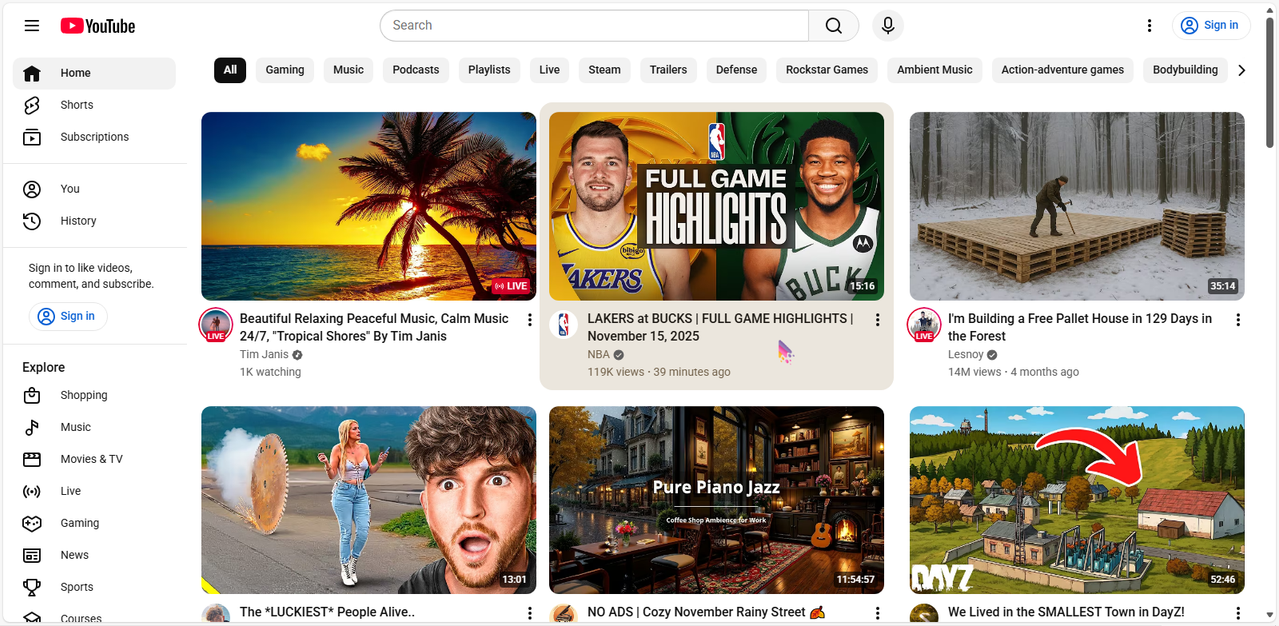
After
