
🎉 欢迎访问GreasyFork.Org 镜像站!本镜像站由公众号【爱吃馍】搭建,用于分享脚本。联系邮箱📮

Greasy fork 爱吃馍镜像

Quick-Text-Buttons

Adds customizable buttons to paste predefined text into the input field on ChatGPT/Gemini.

Dovrai installare un'estensione come Tampermonkey, Greasemonkey o Violentmonkey per installare questo script.

You will need to install an extension such as Tampermonkey to install this script.

Dovrai installare un'estensione come Tampermonkey o Violentmonkey per installare questo script.

Dovrai installare un'estensione come Tampermonkey o Userscripts per installare questo script.

Dovrai installare un'estensione come ad esempio Tampermonkey per installare questo script.

Dovrai installare un gestore di script utente per installare questo script.

(Ho già un gestore di script utente, lasciamelo installare!)

🚀 安装遇到问题?关注公众号获取帮助

公众号二维码

扫码关注【爱吃馍】

回复【脚本】获取最新教程和防失联地址

Dovrai installare un'estensione come ad esempio Stylus per installare questo stile.

Dovrai installare un'estensione come ad esempio Stylus per installare questo stile.

Dovrai installare un'estensione come ad esempio Stylus per installare questo stile.

Dovrai installare un'estensione per la gestione degli stili utente per installare questo stile.

Dovrai installare un'estensione per la gestione degli stili utente per installare questo stile.

Dovrai installare un'estensione per la gestione degli stili utente per installare questo stile.

(Ho già un gestore di stile utente, lasciamelo installare!)

🚀 安装遇到问题?关注公众号获取帮助

公众号二维码

扫码关注【爱吃馍】

回复【脚本】获取最新教程和防失联地址

Autore
p65536
Installazioni giornaliere
1
Installazioni totali
17
Valutazione
0 0 0
Versione
2.2.0
Creato il
05/08/2025
Aggiornato il
03/12/2025
Dimensione
247 KB
Licenza
MIT
Applica a

Overview

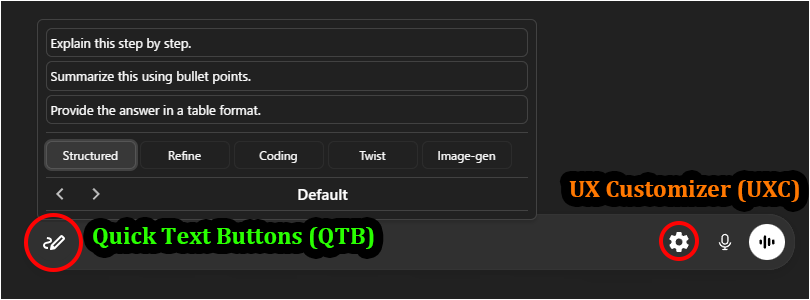
Quick-Text-Buttons (QTB) is a utility script that adds customizable buttons to quickly insert predefined text into the input fields of AI services like ChatGPT and Gemini. You can efficiently manage and utilize frequently used instructions and prompts by organizing them into "profiles" and "categories."

Currently, it supports the following AI services:

  • ChatGPT
  • Gemini

Recommended Companion:
Pair this with UX Customizer (UXC) for a complete UI overhaul.
QTB optimizes Input, while UXC optimizes UI & Navigation—together, they provide the ultimate chat experience.

Key Features

  • Streamlined UI integrated into the input area
  • Intuitive text editing via GUI
  • Manage registered text by classifying it into "profiles" and "categories"
  • Switch between profiles (sets of categories) to use text sets tailored for different purposes
  • Specify the insertion position of the text (cursor position / start / end)
  • Option to automatically insert a newline before or after the text
  • Choose between "Hover" or "Click" to open the text list
  • Settings export/import functionality (in JSON format)
  • Includes sample settings, making it easy to get started.

Screenshots (Images are for ChatGPT)

Quick Text Buttons Showcase Image

  • Perfect Match: Works seamlessly with UX Customizer ( ChatGPT / Gemini ) to enhance the visual interface and navigation.

Getting Started

  • Insert Text: Hovering (or Clicking, depending on settings) over the Quick Text button (pen icon) at the bottom-left of the chat input field will display the list of registered texts. Clicking one will insert the text into the input field.
  • Settings: Right-clicking the button opens the Settings Panel to edit texts, manage profiles, and change options.
  • The easiest way to get started is to import the sample file and modify its contents to your liking.
    Please import the sample JSON from the link above via the script's settings screen (JSON modal).

More info

Full Guide & Details on GitHub:


This script is open-source and licensed under the MIT License.
