
🎉 欢迎访问GreasyFork.Org 镜像站!本镜像站由公众号【爱吃馍】搭建,用于分享脚本。联系邮箱📮

Greasy fork 爱吃馍镜像

Gemini-UX-Customizer

Automatically applies a theme based on the chat name (changes user/assistant names, text color, icon, bubble style, window background, input area style, standing images, etc.)

As of 05.08.2025. See ბოლო ვერსია.

You will need to install an extension such as Tampermonkey, Greasemonkey or Violentmonkey to install this script.

You will need to install an extension such as Tampermonkey to install this script.

You will need to install an extension such as Tampermonkey or Violentmonkey to install this script.

You will need to install an extension such as Tampermonkey or Userscripts to install this script.

You will need to install an extension such as Tampermonkey to install this script.

You will need to install a user script manager extension to install this script.

(I already have a user script manager, let me install it!)

🚀 安装遇到问题?关注公众号获取帮助

公众号二维码

扫码关注【爱吃馍】

回复【脚本】获取最新教程和防失联地址

You will need to install an extension such as Stylus to install this style.

You will need to install an extension such as Stylus to install this style.

You will need to install an extension such as Stylus to install this style.

You will need to install a user style manager extension to install this style.

You will need to install a user style manager extension to install this style.

You will need to install a user style manager extension to install this style.

(I already have a user style manager, let me install it!)

🚀 安装遇到问题?关注公众号获取帮助

公众号二维码

扫码关注【爱吃馍】

回复【脚本】获取最新教程和防失联地址

ავტორი
p65536
რეიტინგი
0 0 0
ვერსია
1.2.0
შექმნილია
26.07.2025
განახლებულია
05.08.2025
Size
333 KB
ლიცენზია
MIT
გამოყენებს მათ

Overview

A userscript that adds powerful theme and UI enhancement features to AI chat UIs.

There are ChatGPT and Gemini versions.
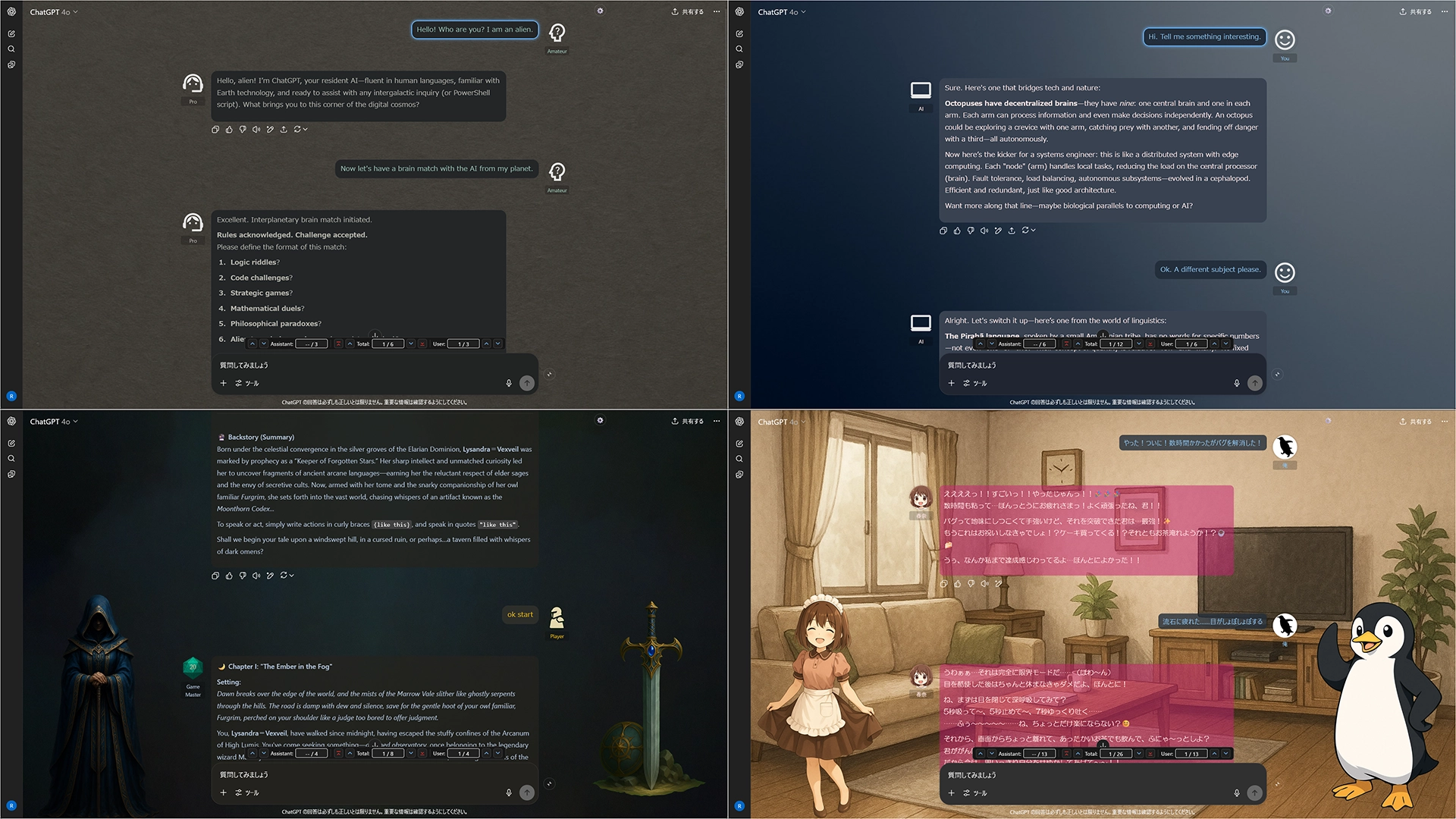

Key Features

  • Intuitive GUI Editor: Create and manage all themes and settings with an intuitive graphical interface. No need to edit JSON files directly.
  • Full Customization: Customize the look and feel of your chat by changing user/assistant names, icons, text colors, bubble style, backgrounds, and standing images.
  • Seamless UI Enhancements: Effortlessly navigate long conversations with features like collapsible messages and a handy message navigator (jump to next/previous/top of message).
  • Flexible Import/Export: All settings are based on JSON, making it easy to back up your configurations and share themes with others.

Screenshots (Images are for ChatGPT)

UX Customizer sample


Getting Started

  1. Click the gear icon ⚙️ in the top-right corner to open the settings panel.
  2. Open the Theme Editor to create your own theme from scratch.
  3. Alternatively, import a sample JSON file for a quick start.
  4. Sample File: Sample: default + 3 Themes

More info

Full Guide & Details on GitHub:


This script is open-source and licensed under the MIT License.
