
🎉 欢迎访问GreasyFork.Org 镜像站!本镜像站由公众号【爱吃馍】搭建,用于分享脚本。联系邮箱📮

Greasy fork 爱吃馍镜像

Greasy Fork is available in English.

Quick-Text-Buttons

Adds customizable buttons to paste predefined text into the input field on ChatGPT/Gemini.

이 스크립트를 설치하려면 Tampermonkey, Greasemonkey 또는 Violentmonkey와 같은 확장 프로그램이 필요합니다.

You will need to install an extension such as Tampermonkey to install this script.

이 스크립트를 설치하려면 Tampermonkey 또는 Violentmonkey와 같은 확장 프로그램이 필요합니다.

이 스크립트를 설치하려면 Tampermonkey 또는 Userscripts와 같은 확장 프로그램이 필요합니다.

이 스크립트를 설치하려면 Tampermonkey와 같은 확장 프로그램이 필요합니다.

이 스크립트를 설치하려면 유저 스크립트 관리자 확장 프로그램이 필요합니다.

(이미 유저 스크립트 관리자가 설치되어 있습니다. 설치를 진행합니다!)

🚀 安装遇到问题?关注公众号获取帮助

公众号二维码

扫码关注【爱吃馍】

回复【脚本】获取最新教程和防失联地址

이 스타일을 설치하려면 Stylus와 같은 확장 프로그램이 필요합니다.

이 스타일을 설치하려면 Stylus와 같은 확장 프로그램이 필요합니다.

이 스타일을 설치하려면 Stylus와 같은 확장 프로그램이 필요합니다.

이 스타일을 설치하려면 유저 스타일 관리자 확장 프로그램이 필요합니다.

이 스타일을 설치하려면 유저 스타일 관리자 확장 프로그램이 필요합니다.

이 스타일을 설치하려면 유저 스타일 관리자 확장 프로그램이 필요합니다.

(이미 유저 스타일 관리자가 설치되어 있습니다. 설치를 진행합니다!)

🚀 安装遇到问题?关注公众号获取帮助

公众号二维码

扫码关注【爱吃馍】

回复【脚本】获取最新教程和防失联地址

작성자
p65536
일일 설치 수
0
총 설치 수
17
평점
0 0 0
버전
2.2.0
생성일
2025-08-05
갱신일
2025-12-03
크기
247KB
라이선스
MIT
적용 사이트

Overview

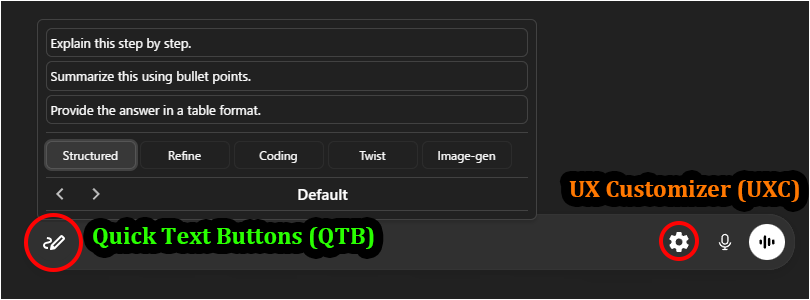
Quick-Text-Buttons (QTB) is a utility script that adds customizable buttons to quickly insert predefined text into the input fields of AI services like ChatGPT and Gemini. You can efficiently manage and utilize frequently used instructions and prompts by organizing them into "profiles" and "categories."

Currently, it supports the following AI services:

  • ChatGPT
  • Gemini

Recommended Companion:
Pair this with UX Customizer (UXC) for a complete UI overhaul.
QTB optimizes Input, while UXC optimizes UI & Navigation—together, they provide the ultimate chat experience.

Key Features

  • Streamlined UI integrated into the input area
  • Intuitive text editing via GUI
  • Manage registered text by classifying it into "profiles" and "categories"
  • Switch between profiles (sets of categories) to use text sets tailored for different purposes
  • Specify the insertion position of the text (cursor position / start / end)
  • Option to automatically insert a newline before or after the text
  • Choose between "Hover" or "Click" to open the text list
  • Settings export/import functionality (in JSON format)
  • Includes sample settings, making it easy to get started.

Screenshots (Images are for ChatGPT)

Quick Text Buttons Showcase Image

  • Perfect Match: Works seamlessly with UX Customizer ( ChatGPT / Gemini ) to enhance the visual interface and navigation.

Getting Started

  • Insert Text: Hovering (or Clicking, depending on settings) over the Quick Text button (pen icon) at the bottom-left of the chat input field will display the list of registered texts. Clicking one will insert the text into the input field.
  • Settings: Right-clicking the button opens the Settings Panel to edit texts, manage profiles, and change options.
  • The easiest way to get started is to import the sample file and modify its contents to your liking.
    Please import the sample JSON from the link above via the script's settings screen (JSON modal).

More info

Full Guide & Details on GitHub:


This script is open-source and licensed under the MIT License.
