
युझर स्क्रिप्ट काय असतात?
User scripts put you in control of your browsing experience. Once installed, they automatically make the sites you visit better by adding features, making them easier to use, or taking out the annoying bits. The user scripts on Greasy Fork were written by other users and posted to share with the world. They're free to install and easy to use.
पाऊल 1 - एखादे युझर स्क्रिप्ट व्यवस्थापक इंस्टॉल करा
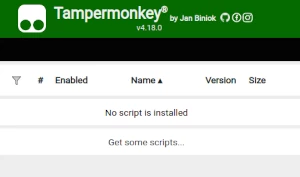
युझर स्क्रिप्ट वापरण्याच्या आधी एक युझर स्क्रिप्ट व्यवस्थापक इंस्टॉल करणे आवश्यक आहे. .तुम्ही कोणता युझर स्क्रिप्ट व्यवस्थापक वापरू शकता हे तुम्ही वापरणार्या ब्राउझरवर अवलंबून आहे.
डेस्कटॉप मोबाइल (अँड्रॉइड) मोबाइल (iOS)
- Chrome: Tampermonkey
- Firefox: Greasemonkey, Tampermonkey, or Violentmonkey
- Safari: Tampermonkey or Userscripts
- Microsoft Edge: Tampermonkey
- Opera: Tampermonkey or Violentmonkey
- Maxthon: Violentmonkey
- AdGuard: (no additional software required)
- Firefox: Greasemonkey, Tampermonkey, or Violentmonkey
- Microsoft Edge: Tampermonkey
- Maxthon: Violentmonkey
- Dolphin: Tampermonkey
- UC: Tampermonkey
- XBrowser
- Safari: Tampermonkey किंवा Userscripts
- Gear: (कोणत्याही अधिक सॉफ्टवेअरची गरज नाही)
पाऊल 2 - युझर स्क्रिप्ट इंस्टॉल करा
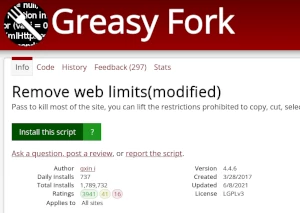
Browse this site to find a user script you want to try. Here is a sample of the most popular scripts:
- 小说下载器 - 一个可扩展的通用型小说下载器。
- मुमू शैली - Moomoo.io/sploop.io मोड [टेक्स्चर पॅक एडिटर/ संगीत प्लेयर/ हॅट कीबिंड्स/ संगीत व्हिज्युअलायझर/ स्किन स्विचर/ अँटी-किक/ ऑटो लॉगिन]
- Gartic Mod Menu - drawing assistant, answer assistant and many more features
- 网课助手|后台自动挂机|视频文档|章节测验|超高倍速|防清进度|全自动无人值守【网课24H自动刷课:www.gaoxiaowk.icu】 - 网课助手,专注于帮助大学生从网课中释放出来。让自己的时间把握在自己的手中,拥有人性化的操作页面,流畅的步骤提示,支持 【知到智慧树】 【超星学习通】 【智慧职教(MOOC学院)】 【职教云】,等网课的学习,作业。具体的功能请查看脚本悬浮窗中的教程页面,网课24H自动刷课:www.gaoxiaowk.icu
- कस्टम स्टिकर - WhatsApp Web मध्ये कस्टम स्टिकर तयार करा.
Once you've found a user script, click the green install button on the user script's page, and your user script manager will ask you to confirm the install.
पाऊल 3 - युझर स्क्रिप्ट वापरा
Go to the site the user script affects. It should automatically do its thing. After trying out the user script for a while, go back to where you installed the user script and leave some feedback for the user script's author.