
🎉 欢迎访问GreasyFork.Org 镜像站!本镜像站由公众号【爱吃馍】搭建,用于分享脚本。联系邮箱📮

Greasy fork 爱吃馍镜像

YouTube - Blokker Forhåndsvisning av Autoplay Miniatyrbilder og Kanaltrailer

Blokkerer forhåndsvisninger av miniatyrbilder ved svev (WebP og video) og stopper kanaltrailere (video + lyd). Beholder fremdriftslinjer, avspillingsknapper og statiske bilder. Ingen innlogging eller tillatelser, kjører ved sidelasting.

Fra 22.11.2025. Se den seneste versjonen.

You will need to install an extension such as Tampermonkey, Greasemonkey or Violentmonkey to install this script.

You will need to install an extension such as Tampermonkey to install this script.

You will need to install an extension such as Tampermonkey or Violentmonkey to install this script.

You will need to install an extension such as Tampermonkey or Userscripts to install this script.

You will need to install an extension such as Tampermonkey to install this script.

You will need to install a user script manager extension to install this script.

(I already have a user script manager, let me install it!)

🚀 安装遇到问题?关注公众号获取帮助

公众号二维码

扫码关注【爱吃馍】

回复【脚本】获取最新教程和防失联地址

You will need to install an extension such as Stylus to install this style.

You will need to install an extension such as Stylus to install this style.

You will need to install an extension such as Stylus to install this style.

You will need to install a user style manager extension to install this style.

You will need to install a user style manager extension to install this style.

You will need to install a user style manager extension to install this style.

(I already have a user style manager, let me install it!)

🚀 安装遇到问题?关注公众号获取帮助

公众号二维码

扫码关注【爱吃馍】

回复【脚本】获取最新教程和防失联地址

Forfatter
miebie.1412
Vurderinger
0 0 0
Versjon
1.4.2
Lagd
11.11.2025
Oppdatert
22.11.2025
Size
33,4 kB
Lisens
MIT
Gjelder

This script blocks YouTube's animated thumbnail hover previews (animated WebP & video) while preserving progress bars, play buttons, and static thumbnails.
Works on all pages: homepage, subscriptions, watch, search, channels, etc.

Save bandwidth and reduce distractions while browsing YouTube
No login required – works instantly, without any configuration
No permissions. Runs at document-start

What's New (v1.4.2)

  • Added full Afrikaans (af) localization
  • Fixed minor spelling/grammar issues in several translations
  • Minor tweaks for smoother and more stable performance

⚙️ Key features:

  • Blocks all animated previews (thumbnails, hover, trailers, GIFs in Posts)
  • Auto-pauses & mutes hidden preview videos (an_webp etc.)
  • 100% coverage via MutationObserver - keeps red progress bars

📥 Install:

  • Have userscript manager? Click InstallReload YouTube
  • First time? Install Tampermonkey or Violentmonkey (or Greasemonkey on Firefox) → Click Install this scriptReload YouTube
  • Quick tip: On Safari/macOS, use Violentmonkey (Tampermonkey works but needs extra setup)

⚠️ Note:

  • Enable Developer Mode and Allow User Scripts (if available) in Extensions, otherwise the script won’t run

Script chặn hiệu ứng xem trước khi hover thumbnail trên YouTube (ảnh động WebP & video), nhưng giữ nguyên thanh tiến độ, nút play và ảnh tĩnh.
Chạy mọi trang: trang chủ, tab Đăng ký, xem video, tìm kiếm, kênh...

Tiết kiệm băng thông và giảm phân tâm khi lướt YouTube
Không cần đăng nhập – hoạt động ngay, không cần thay đổi bất kỳ cài đặt nào
Không cần quyền. Chạy ngay khi tải trang (document-start)

Cập Nhật Mới (v1.4.2)

  • Thêm hoàn chỉnh bản dịch tiếng Afrikaans (af)
  • Sửa lỗi chính tả nhỏ ở một số ngôn ngữ
  • Tinh chỉnh nhỏ để script chạy ổn định và mượt hơn

⚙️ Tính năng chính:

  • Chặn hết mọi preview động (thumbnail, hover, trailer, GIF Bài đăng)
  • Tự động tạm dừng & tắt tiếng video ẩn (an_webp…)
  • Bao phủ toàn diện bằng MutationObserver - vẫn giữ thanh tiến độ màu đỏ

📥 Cài đặt:

  • Có userscript manager? Bấm Cài đặtTải lại YouTube
  • Lần đầu? Cài Tampermonkey hoặc Violentmonkey (hoặc Greasemonkey trên Firefox) → Bấm Cài đặt script nàyTải lại YouTube
  • Mẹo nhỏ: Trên Safari/macOS, dùng Violentmonkey (Tampermonkey cũng được nhưng cần thêm bước)

⚠️ Lưu ý:

  • Bật Developer ModeAllow User Scripts (nếu có) trong mục Tiện ích, nếu không script sẽ không chạy

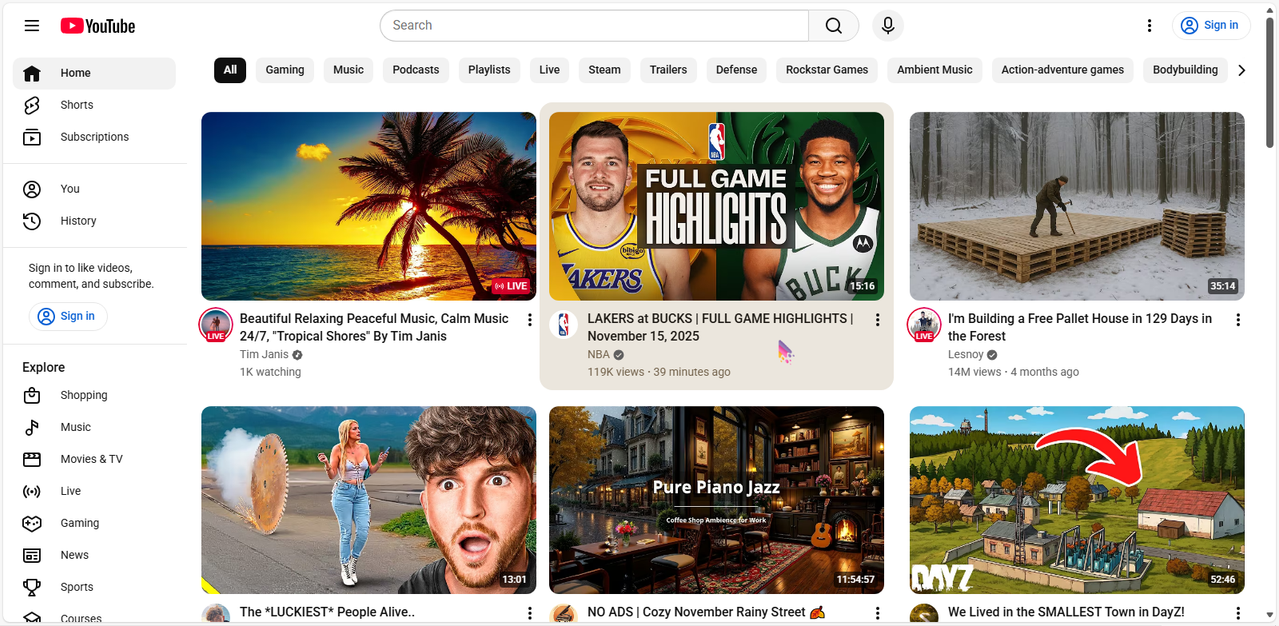
Result (cursor included) / Kết quả (có con trỏ):
After
