×

扫码关注【爱吃馍】
获取最新脚本和技术支持!
关注公众号,获取最新地址

Найдите пользовательские скрипты для текущего веб-сайта из популярных репозиториев скриптов
A useful user script that helps you quickly find user scripts for the current website, with support for multiple popular script repositories.
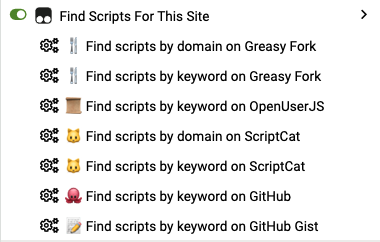
Ensure your browser has one of the following user script managers installed:
The script automatically detects the browser's language and displays the corresponding menu text. The following languages are currently supported:
GM_registerMenuCommand to register multiple search options.GM_openInTab to open search results in a new tab.| Repository | Icon | Search Methods |
|---|---|---|
| Greasy Fork | 🍴 | Domain Search, Keyword Search |
| Sleazy Fork | 🔞 | Domain Search, Keyword Search |
| OpenUserJS | 📜 | Keyword Search |
| ScriptCat | 🐱 | Domain Search, Keyword Search |
| GitHub | 🐙 | Keyword Search (JavaScript code) |
| GitHub Gist | 📝 | Keyword Search (JavaScript code) |
The script provides configurable options in the CONFIG object:
const CONFIG = {
  REPOSITORIES: [
    // Repository configurations...
  ],
  DEBUG: false, // Debug mode switch
}
To see detailed logs, you can set CONFIG.DEBUG to true:
DEBUG: true,
Q: The menu items are not showing up?
A: Please check the following:
Q: The search results are inaccurate?
A: Possible reasons:
DEBUG: true).Here are some other useful scripts that can enhance your browsing experience:
Issues and Pull Requests are welcome!
MIT License - see the LICENSE file for details.