🎉 欢迎访问GreasyFork.Org 镜像站!本镜像站由公众号【爱吃馍】搭建,用于分享脚本。联系邮箱📮

Greasy fork 爱吃馍镜像

YouTube RM3 - Reduce Memory Usage by Reusing Components

A simple tool that runs in the background to reuse YouTube components, thereby reducing memory usage over time.

You will need to install an extension such as Tampermonkey, Greasemonkey or Violentmonkey to install this script.

You will need to install an extension such as Tampermonkey to install this script.

You will need to install an extension such as Tampermonkey or Violentmonkey to install this script.

You will need to install an extension such as Tampermonkey or Userscripts to install this script.

You will need to install an extension such as Tampermonkey to install this script.

You will need to install a user script manager extension to install this script.

(I already have a user script manager, let me install it!)

🚀 安装遇到问题?关注公众号获取帮助

公众号二维码

扫码关注【爱吃馍】

回复【脚本】获取最新教程和防失联地址

You will need to install an extension such as Stylus to install this style.

You will need to install an extension such as Stylus to install this style.

You will need to install an extension such as Stylus to install this style.

You will need to install a user style manager extension to install this style.

You will need to install a user style manager extension to install this style.

You will need to install a user style manager extension to install this style.

(I already have a user style manager, let me install it!)

🚀 安装遇到问题?关注公众号获取帮助

公众号二维码

扫码关注【爱吃馍】

回复【脚本】获取最新教程和防失联地址

Author
𝖢𝖸 𝖥𝗎𝗇𝗀
Daily installs
1
Total installs
897
Ratings
6 0 0
Version
0.1.0019
Created
2024-12-21
Updated
2024-12-28
Size
31.7 KB
Compatibility
Compatible with Firefox Compatible with Chrome Compatible with Opera Compatible with Safari Compatible with Edge
License
MIT
Applies to

YouTube RM3

Description

Now it work for chatroom elements mostly. The further support is under review.

Way of Test

  1. https://www.youtube.com/watch?v=IKKar5SS29E
  2. Open Chat Room
  3. The pre tickers are shown.
  4. wait for few seconds ( 3s ~ 5s )
  5. change from "top chats" to "all chats"
  6. all content refreshed.
  7. pre tickers disappear.
  8. wait for the next next ticker appears ( sufficient time for 4s CONFIRM_TIME)
  9. the tickers appear would cause less memory increase.
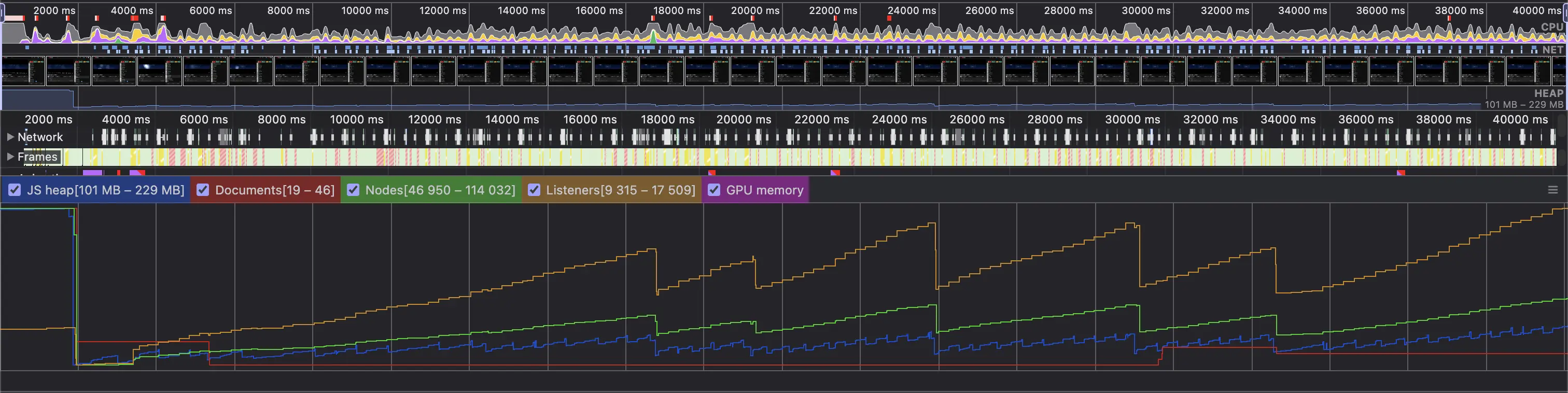
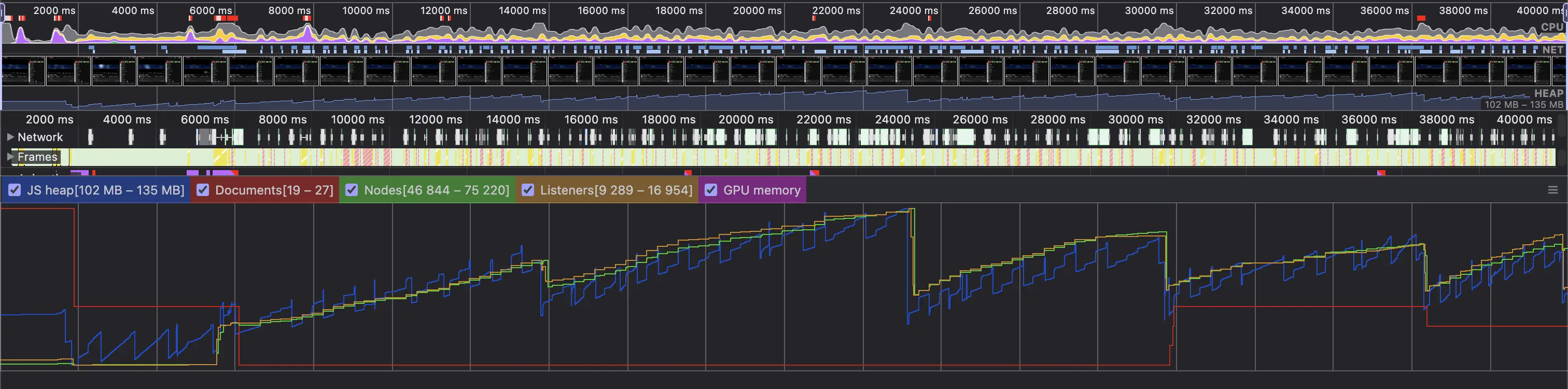
  10. can be verified in DevTools Performance Recording.

General Test (Loading of Chatroom in a Live Archive for 30s)

  1. https://www.youtube.com/watch?v=IKKar5SS29E
  2. Open Chat Room
  3. Play 1s (live chat initialization)
  4. Open DevTools and start record
  5. Record for >30s

Before

After