
🎉 欢迎访问GreasyFork.Org 镜像站!本镜像站由公众号【爱吃馍】搭建,用于分享脚本。联系邮箱📮

Greasy fork 爱吃馍镜像

PikPak File Manager

Enhances PikPak with fast navigation, duplicate scan, bulk rename, and advanced file-management tools.
You will need to install an extension such as Tampermonkey, Greasemonkey or Violentmonkey to install this script.

You will need to install an extension such as Tampermonkey to install this script.

You will need to install an extension such as Tampermonkey or Violentmonkey to install this script.

You will need to install an extension such as Tampermonkey or Userscripts to install this script.

You will need to install an extension such as Tampermonkey to install this script.

You will need to install a user script manager extension to install this script.

(I already have a user script manager, let me install it!)

🚀 安装遇到问题?关注公众号获取帮助

公众号二维码

扫码关注【爱吃馍】

回复【脚本】获取最新教程和防失联地址

You will need to install an extension such as Stylus to install this style.

You will need to install an extension such as Stylus to install this style.

You will need to install an extension such as Stylus to install this style.

You will need to install a user style manager extension to install this style.

You will need to install a user style manager extension to install this style.

You will need to install a user style manager extension to install this style.

(I already have a user style manager, let me install it!)

🚀 安装遇到问题?关注公众号获取帮助

公众号二维码

扫码关注【爱吃馍】

回复【脚本】获取最新教程和防失联地址

Author
poihoii
Daily installs
2
Total installs
55
Ratings
3 0 0
Version
1.2.0
Created
2025-11-23
Updated
2025-11-29
Size
113 KB
License
MIT
Applies to

main


Logo PikPak File Manager


Author Version License

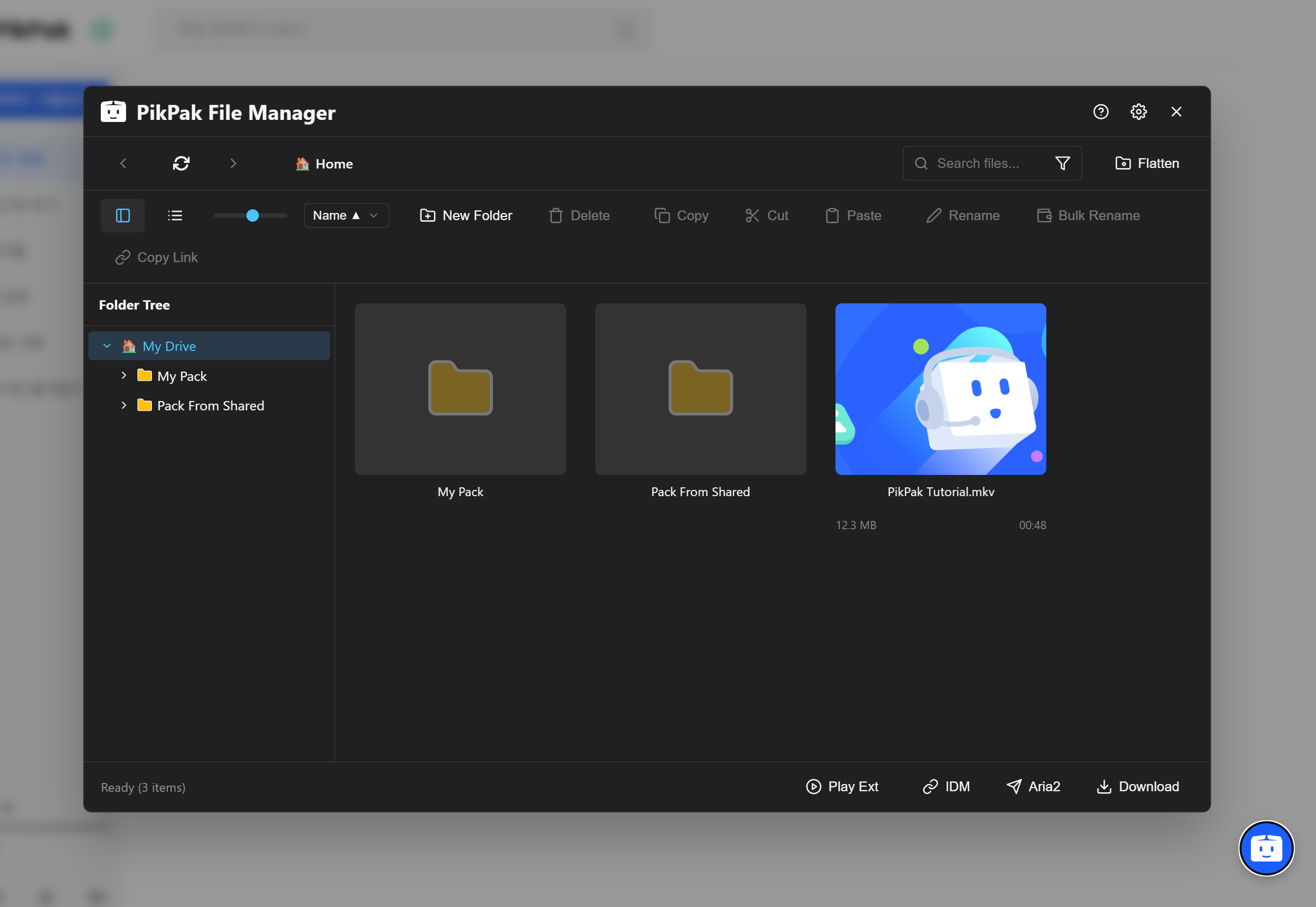
A file management script to enhance the user experience of the PikPak Web Client.

To improve the existing PikPak web environment, various file management features have been implemented as a UserScript using Tampermonkey.


🌍 Supported Languages : 한국어 | English | 中文 (简体) | 日本語


✨ Key Features

🖥️ Desktop Style UI

  • List View: Provides an intuitive list design similar to Windows Explorer.
  • Dark Mode: Automatically supports a dark mode that matches your system theme.
  • Responsive Layout: Optimizes the interface for various window sizes (Supports min-width 480px).
  • Status Display: Real-time verification of selected file counts, loading status, and more.

📂 Advanced File Management

  • Structure Flattening: Recursively searches for all files hidden in subfolders and flattens them into a single list.
  • Duplicate File Cleanup: Identifies duplicate files by comparing Hash, Filename, and Playback Time.
  • Smart Organize: Includes tools to automatically select files to delete based on size or date.

✏️ Batch Rename

  • Pattern Change: Rename files in bulk using patterns like Video {n}.
  • String Replacement: Find and replace or delete specific words in hundreds of filenames at once.

🚀 Download & Play

  • Aria2 Integration: Send download tasks directly to a local Aria2 RPC server. (Includes connection test & secure token input)
  • IDM Support: Generates export files (.ef2) for Internet Download Manager.
  • Streaming Play: Instantly play videos using external players like PotPlayer or VLC.
  • Playlist: Generates .m3u playlist files for selected videos.

📌 Other convenience features like Hotkeys, SVG Icons, and Custom Modals


⌨️ Hotkeys

Key Action Key Action
Alt + ← or Backspace Previous Page (Mouse Button 4) Alt + → Next Page (Mouse Button 5)
F5 Refresh List F8 New Folder
F2 Rename or Batch Rename Delete Move selected items to Trash
Ctrl + A Select All Ctrl + C or + X or + V  Copy / Cut / Paste
Alt + S Open Settings Esc Deselect / Close Popup


📥 Installation

This script is based on Tampermonkey.

You can apply the script code posted in the repository directly or download it from GreasyFork.

  1. Install the Tampermonkey browser extension. (Supports Chrome, Edge, Firefox)
  2. Click the + button (Add new script) on the Tampermonkey dashboard.
  3. Copy and paste the entire provided user.js code and press Ctrl + S to save.
  4. Access the PikPak Website and click the Floating Button at the bottom right to run the manager.


🛠️ Development

This script was written by separating each function into Modules, and then built into a single script.

# 1. Clone Repository
git clone [https://github.com/poihoii/PikPak_FileManager.git](https://github.com/poihoii/PikPak_FileManager.git)

# 2. Install Dependencies
npm install

# 3. Real-time Build Test (Dev)
npm run dev

# 4. Final Build (Production)
npm run build
