
🎉 欢迎访问GreasyFork.Org 镜像站!本镜像站由公众号【爱吃馍】搭建,用于分享脚本。联系邮箱📮

Greasy fork 爱吃馍镜像

🎧 YouTube Audio Enhancer Pro V7.3

Professional Audio Enhancer: Dolby Atmos, 3D Surround, & Bass Boost.

您需要先安裝使用者腳本管理器擴展,如 TampermonkeyGreasemonkeyViolentmonkey 之後才能安裝該腳本。

You will need to install an extension such as Tampermonkey to install this script.

您需要先安裝使用者腳本管理器擴充功能,如 TampermonkeyViolentmonkey 後才能安裝該腳本。

您需要先安裝使用者腳本管理器擴充功能,如 TampermonkeyUserscripts 後才能安裝該腳本。

你需要先安裝一款使用者腳本管理器擴展,比如 Tampermonkey,才能安裝此腳本

您需要先安裝使用者腳本管理器擴充功能後才能安裝該腳本。

(我已經安裝了使用者腳本管理器,讓我安裝!)

🚀 安装遇到问题?关注公众号获取帮助

公众号二维码

扫码关注【爱吃馍】

回复【脚本】获取最新教程和防失联地址

你需要先安裝一款使用者樣式管理器擴展,比如 Stylus,才能安裝此樣式

你需要先安裝一款使用者樣式管理器擴展,比如 Stylus,才能安裝此樣式

你需要先安裝一款使用者樣式管理器擴展,比如 Stylus,才能安裝此樣式

你需要先安裝一款使用者樣式管理器擴展後才能安裝此樣式

你需要先安裝一款使用者樣式管理器擴展後才能安裝此樣式

你需要先安裝一款使用者樣式管理器擴展後才能安裝此樣式

(我已經安裝了使用者樣式管理器,讓我安裝!)

🚀 安装遇到问题?关注公众号获取帮助

公众号二维码

扫码关注【爱吃馍】

回复【脚本】获取最新教程和防失联地址

作者
Moryata
今日安裝
1
安裝總數
17
評價
1 0 0
版本
7.3
建立日期
2025-11-20
更新日期
2025-11-20
尺寸
17.1 KB
授權條款
MIT
腳本執行於

🎧 YouTube Audio Enhancer Pro V7.3

The Ultimate Audio Experience for YouTube

Transform your YouTube listening experience with a professional-grade audio engine directly in your browser. This script adds a sleek, draggable Glassmorphism panel that gives you full control over your audio routing, simulating Dolby Atmos and Cinema Surround Sound.
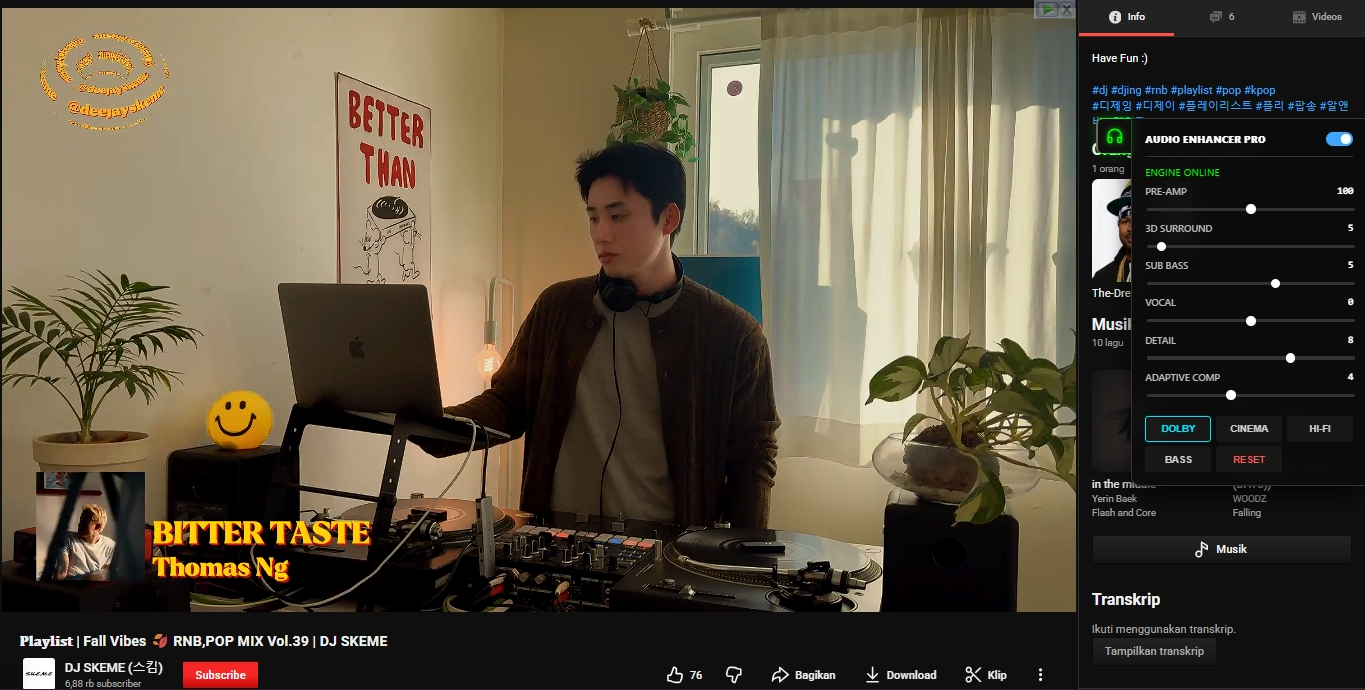
Audio Enhancer UI


🔥 Key Features (V7.3 Update)

  • 🚀 Dolby Atmos Simulation: Dedicated preset that widens the soundstage and enhances dynamic range for a theater-like experience.
  • 🔊 3D Surround Sound: New slider logic that manipulates stereo separation and reverb tail (compressor release) to create immersive spatial audio.
  • 💾 Auto-Save Settings: Your settings (Volume, EQ, Position) are now saved automatically. Reload the page, and your perfect sound is still there.
  • 💎 Glassmorphism UI: A beautiful, semi-transparent interface that blurs the background. It looks native and modern.
  • 🧩 Adaptive Compressor: "Clarity" slider intelligently adjusts threshold and ratio to ensure quiet dialogue is heard without distorting loud explosions.
  • 🔧 Fixed & Stable: Solved menu dragging issues and click conflicts. Works with YouTube's single-page navigation (no refresh needed).

🎛️ Presets Included:

  1. DOLBY: High dynamic range, wide soundstage, deep bass (Perfect for Movies/Trailers).
  2. CINEMA: Balanced surround sound for casual viewing.
  3. HI-FI: Pure stereo focus, minimal coloring (Perfect for Music).
  4. BASS: Aggressive low-end boost for EDM/Trap.

🛠️ How to Use:

  1. Install the script.
  2. Open any YouTube video.
  3. Click the Headphone Icon (🎧) on the right side of the screen.
  4. Drag the icon to move it anywhere. Click it to open the panel.
  5. Select a preset like DOLBY or adjust the 3D SURROUND slider manually.
  6. Enjoy!

Made with ❤️ by Moryata
