🎉 欢迎访问GreasyFork.Org 镜像站!本镜像站由公众号【爱吃馍】搭建,用于分享脚本。联系邮箱📮

Greasy fork 爱吃馍镜像

YouTubeTempo - Ultimate Playback Speed Controller

Master your YouTube experience with fully customizable, precision speed controls, and a clean, accessible, collapsible settings menu.

You will need to install an extension such as Tampermonkey, Greasemonkey or Violentmonkey to install this script.

You will need to install an extension such as Tampermonkey to install this script.

You will need to install an extension such as Tampermonkey or Violentmonkey to install this script.

You will need to install an extension such as Tampermonkey or Userscripts to install this script.

You will need to install an extension such as Tampermonkey to install this script.

You will need to install a user script manager extension to install this script.

(I already have a user script manager, let me install it!)

🚀 安装遇到问题?关注公众号获取帮助

公众号二维码

扫码关注【爱吃馍】

回复【脚本】获取最新教程和防失联地址

You will need to install an extension such as Stylus to install this style.

You will need to install an extension such as Stylus to install this style.

You will need to install an extension such as Stylus to install this style.

You will need to install a user style manager extension to install this style.

You will need to install a user style manager extension to install this style.

You will need to install a user style manager extension to install this style.

(I already have a user style manager, let me install it!)

🚀 安装遇到问题?关注公众号获取帮助

公众号二维码

扫码关注【爱吃馍】

回复【脚本】获取最新教程和防失联地址

Author
Hasan Beder
Daily installs
0
Total installs
32
Ratings
2 0 0
Version
1.0.1
Created
2025-07-17
Updated
2025-10-09
Size
53.3 KB
License
GPL-3.0
Applies to

🎬 YouTubeTempo

Ultimate YouTube Playback Speed Controller
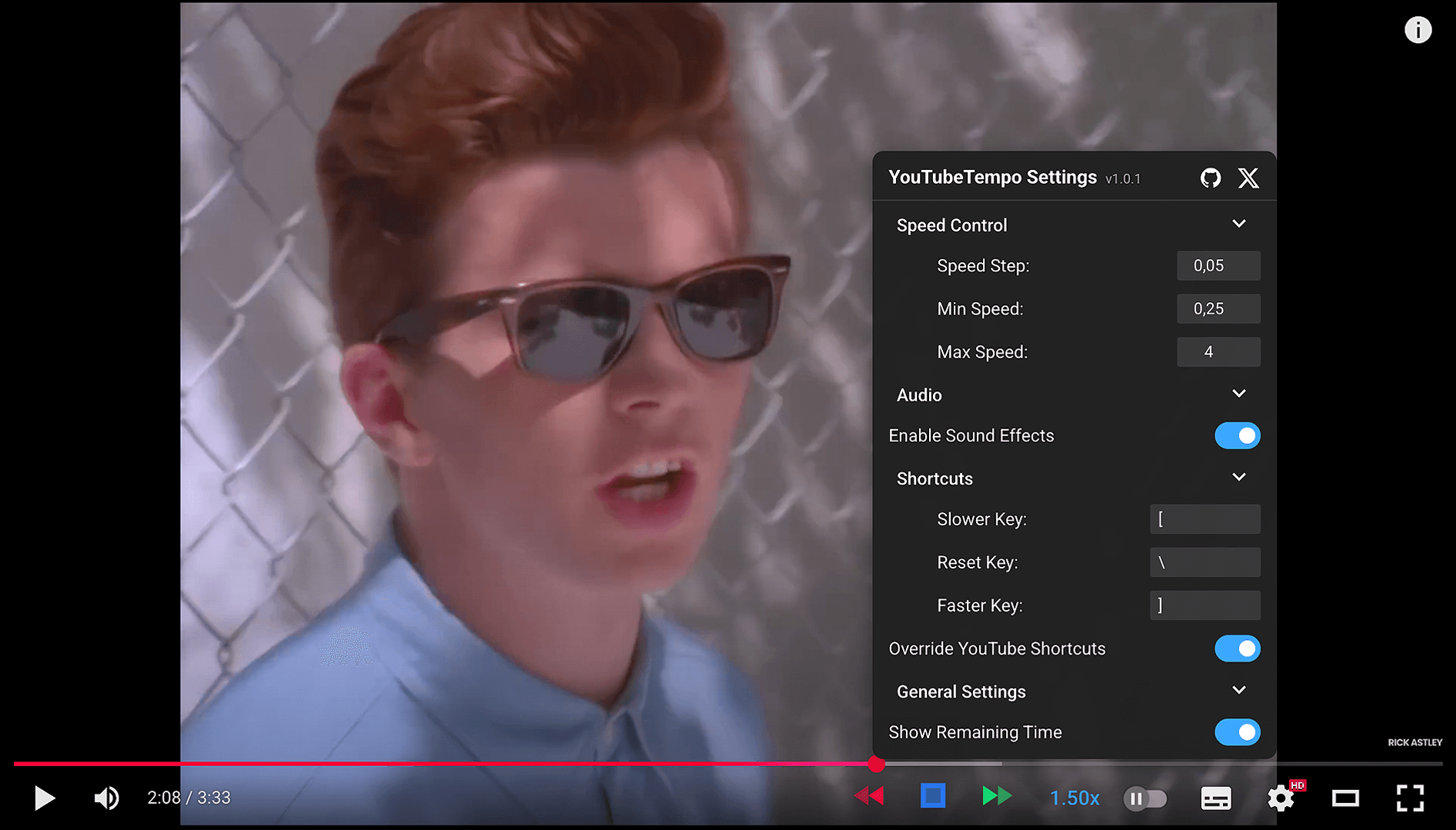
YouTubeTempo Screenshot

VersionLicenseStarsGreasyfork

🎯 Master your YouTube experience with precision speed controls!

Take complete control of YouTube playback with fully customizable speed controls, keyboard shortcuts, and a clean, accessible interface designed for performance.


✨ Features

🎛️ Precision Speed Control

  • Custom Speed Steps: Set your preferred increment from 0.01x to 0.5x.
  • Wide Playback Range: Freely adjust speed from as low as 0.1x up to 16.0x.
  • Instant Visual Feedback: The speed indicator changes color to reflect the current playback rate.
  • Playback Memory: Remembers and automatically applies your last-used speed setting for new videos.

⌨️ Fully Customizable Keyboard Shortcuts

  • Personalize Your Keys: Assign any key for slowing down, speeding up, or resetting playback speed.
  • Sensible Defaults: Comes pre-configured with [ (slower), ] (faster), and \ (reset).
  • Override Mode: Optionally prevent your shortcuts from triggering YouTube's default actions.
  • Mouse-Free Control: Manage playback speed without ever leaving the keyboard.

🎨 Clean & Integrated User Interface

  • Seamless Design: The controls are designed to perfectly match YouTube's native player aesthetic.
  • Accessible: Built with ARIA attributes for screen reader compatibility.
  • Collapsible Settings Menu: Access all options in a clean, non-intrusive popup menu.
  • Audio Feedback: Enable or disable subtle sound effects for speed adjustments.

🚀 Quick Start

📦 Installation

MethodDescriptionLink
🟢 GreasyforkRecommendedInstall on Greasyfork
📁 GitHubLatest versionDownload from GitHub

🛠️ Prerequisites

Install a userscript manager first:

TampermonkeyViolentmonkeyGreasemonkey

🎯 Usage

🎮 Basic Controls

1. 🎬 Navigate to any YouTube video
2. 🔍 Look for YouTubeTempo controls next to volume slider
3. ⚡ Use speed control buttons (◀ slower, ▶ faster) to adjust speed
4. ⚙️ Click speed indicator to open settings

⌨️ Keyboard Shortcuts

KeyActionStatus
[Decrease Speed✅ Customizable
]Increase Speed✅ Customizable
\Reset to 1.0x✅ Customizable
Click SpeedOpen Settings🔒 Fixed

⚙️ Advanced Configuration


🎛️ Speed Settings
  • Speed Step: Increment size (0.01x - 0.5x)
  • Min Speed: Lowest allowed speed (0.1x - 1.0x)
  • Max Speed: Highest allowed speed (1.0x - 16.0x)


🎨 General & UI Settings
  • Remaining Time: Show time left calculation
  • Color Indicators: Speed-based color coding

🔧 Troubleshooting


❌ YouTubeTempo not appearing
  • 🔄 Refresh the YouTube page
  • ✅ Check if userscript manager is enabled
  • 🔍 Verify script is installed and active
  • 🔒 Try incognito/private browsing mode


⚡ Speed not changing
  • 🎬 Click directly on the video player
  • 🔍 Check for extension conflicts
  • 🔄 Disable and re-enable the script
  • 🎯 Ensure video player has focus


⌨️ Keyboard shortcuts not working
  • ⚙️ Enable "Override YouTube Shortcuts" in settings
  • 🔍 Check for shortcut conflicts
  • 🎯 Ensure video player has focus
  • 🔄 Try refreshing the page

🌐 Browser Support

BrowserSupportNotes
Chrome✅ FullRecommended
Firefox✅ FullExcellent
Safari✅ FullSupported
Edge✅ FullSupported
Opera✅ FullSupported

🤝 Contributing

We welcome contributions! Here's how you can help:

Report BugRequest FeatureSubmit Pull Request

💡 Ways to Contribute

  • 🐛 Report bugs via GitHub Issues
  • 💡 Suggest features via GitHub Issues
  • 🔧 Submit pull requests for fixes and improvements
  • 📖 Improve documentation and help others
  • 🌍 Help with translations for your language

📄 License

This project is licensed under the GPL-3.0 License

License


💝 Support

GitHub IssuesGitHub DiscussionsContact

🙏 Acknowledgments

Thanks to YouTube for the amazing platform • Userscript community for inspiration • All contributors who make this project better

Made with ❤️ by Hasan Beder

Star this repo if you find it useful!